
From Blueprint to Photorealistic Render in Seconds: How Image-to-Image AI is Revolutionizing Architectural Visualization Workflows
 By Antoli Felipe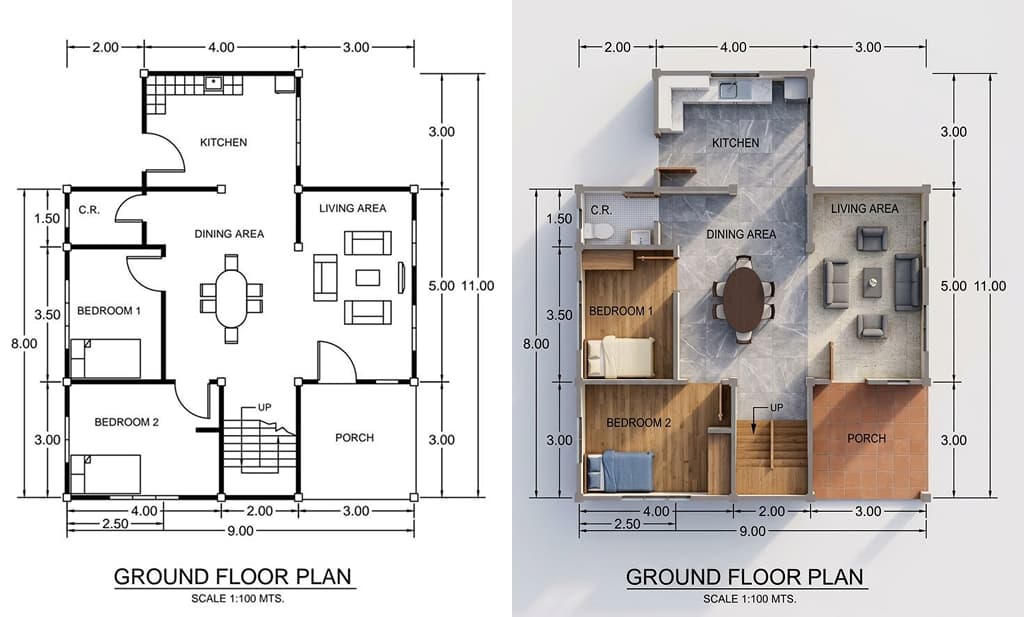
The 72-Hour Problem That Plagued Architecture for Decades
For decades, architectural visualization has been the bottleneck of the design process. You've been there: it's Thursday afternoon, your client presentation is Monday morning, and your visualization team just informed you that the photorealistic exterior render you requested will take 72 hours to complete—assuming no revisions.
This was the reality of architectural practice. The technical precision of CAD and BIM tools (Revit, ArchiCAD, Rhino) created a communication gap between architects and clients. We spoke in orthographic projections, line weights, and construction documents. Clients spoke in emotions, atmosphere, and "curb appeal." Bridging this gap required labor-intensive 3D modeling (a process now also being rapidly accelerated by tools like AI 3D Model Generator), texturing, lighting setup, and rendering—processes that could consume days for a single image.
Enter 2025. The architectural visualization landscape is experiencing a seismic shift. Over 75% of architectural professionals now use real-time rendering daily, and more than 55% are actively implementing AI-driven solutions that transform workflows from linear, time-intensive pipelines into fluid, iterative creative processes.
The catalyst? Image-to-image (img2img) AI transformation technologies—functioning as a powerful AI image generator from image—that can convert your technical CAD screenshots into photorealistic architectural photographs in seconds—not days.
Understanding the Technology: How Img2Img Actually Works
Before diving into workflows, let's demystify the technology powering this revolution. Image-to-image generation uses diffusion models—AI systems that learn to transform existing images into new versions while preserving structural integrity.
Unlike text-to-image generation (which creates images from scratch based on text descriptions), img2img starts with your existing visual input—your CAD screenshot, SketchUp viewport, or Revit 3D view—and transforms it while maintaining geometric relationships. Advanced img2img systems use structural guidance mechanisms that act like a digital stencil, ensuring the AI preserves your building's proportions, spatial layout, and architectural elements during transformation.
The Technical Architecture:
- Structural Preservation: Advanced algorithms analyze your input to identify edges, depth, and spatial relationships, locking these elements during transformation
- Denoising Strength: Controls how much the AI deviates from your original input (0.2 = subtle enhancement, 0.8 = dramatic transformation)
- CFG Scale: Determines how strictly the AI follows your text prompts versus maintaining image coherence
- Semantic Consistency: Production-grade models maintain building proportions, spatial relationships, and structural elements while applying stylistic and material changes
What makes 2025 different from earlier AI experiments is maturity. These aren't novelty tools—they're production-ready workflows adopted by international firms like Foster+Partners and Heatherwick Studio, now accessible to practices of any size through streamlined interfaces.
The 5-Minute Workflow: From CAD Lines to Client-Ready Visuals
Here's the workflow that forward-thinking firms are using right now. This process transforms what used to be a 3-day rendering task into a 5-minute AI-enhanced pipeline:
Step 1: Prepare Your Model View (2 minutes)
Export a clean viewport screenshot from your CAD software (Revit, SketchUp, Rhino, ArchiCAD—platform doesn't matter). Key requirements:
- Minimum 1920×1080 resolution
- Turn off dimensions, annotations, and construction lines
- Set your final camera angle
- Export as PNG for best quality
This screenshot becomes your structural anchor—the architectural DNA that AI will preserve while transforming aesthetics.
Step 2: Configure Your Transformation Parameters
Upload your CAD screenshot to your AI image editor interface. The system automatically analyzes geometric structure, but you control the creative direction:
Essential Settings:
- Denoising Strength: 0.4-0.6 for architectural work (balances fidelity with enhancement)
- Resolution: Match or exceed your input dimensions
- Sampling Steps: 30-50 for optimal quality-to-speed ratio
Step 3: Craft Your Architectural Prompt
The prompt bridges technical precision and aesthetic vision. Structure it hierarchically: [Subject] + [Style/Materials] + [Environment/Lighting] + [Technical Quality] Example: "Modern minimalist residential architecture, board-formed concrete and floor-to-ceiling glass facade, warm natural daylight, golden hour lighting, landscaped garden foreground, professional architectural photography, 8k resolution, sharp focus, photorealistic"
Step 4: Generate and Iterate
Click generate. Wait 10-60 seconds depending on resolution. Review output.
The true power emerges in iteration. Because generation takes seconds rather than hours, you can explore dozens of variations during a single client meeting:
- "What if we used warm terracotta instead of cool concrete?"
- "How does this look at golden hour versus midday?"
- "Can we visualize the biophilic design with integrated vegetation?"
This rapid iteration capability produces more refined designs while compressing project timelines from weeks to days.
Real-World Applications: Where Img2Img Transforms Practice
1. Early-Stage Design Exploration
Traditional process: Sketch concepts → Build rough 3D models → Wait for renders → Present limited options to client.
AI-enhanced process: Sketch → Instant photorealistic visualization → Explore 20+ variations → Client selects direction → Develop refined model.
Leading practitioners describe this as opening "an entirely new avenue of creative exploration. The images should never be interpreted literally, but they evoke alternate possibilities at a hallucinating quickness." This isn't about replacing design thinking—it's about accelerating the exploration phase so you can consider more comprehensive options in your search for ideal architectural solutions.
2. Client Communication & Stakeholder Engagement
The language barrier between technical CAD and emotional client understanding disappears. Instead of explaining "this line represents a curtain wall system," you show them sunlight streaming through floor-to-ceiling glass.
Firms report that this visual immediacy transforms client meetings from passive presentations into collaborative design sessions. Stakeholders can evaluate spatial relationships, material atmospheres, and lighting quality in real-time, leading to more informed decisions and significantly fewer change requests during construction.
3. Sustainability Visualization
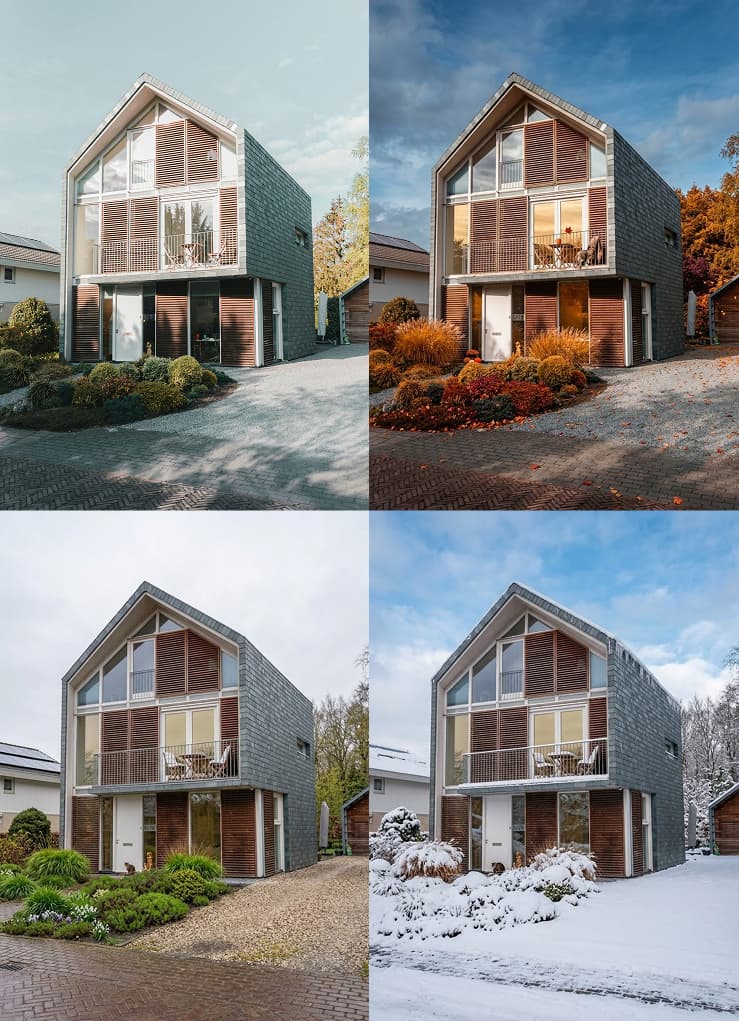
2025 has seen sustainability visualization become a critical differentiator. Img2img workflows now enable:
- Energy Performance Visualization: Overlay heat loss, solar gain, and airflow patterns on photorealistic imagery
- Seasonal Variation Studies: Show the same design under different weather conditions and sun angles
- Material Impact Communication: Visualize embedded carbon footprint alongside aesthetic choices
- Biophilic Integration: Demonstrate how natural elements integrate with architectural form
Clients no longer just see how buildings look—they understand how they perform environmentally.
4. Heritage & Adaptive Reuse Projects
For renovation and historic preservation, img2img excels at visualizing "before and after" transformations. Upload existing condition photographs or scanned blueprints, apply transformation prompts like "renovated historic townhouse facade, restored brick and stucco mix, modern interventions respecting heritage context," and generate compelling preservation proposals.
5. Marketing & Business Development
Small firms previously unable to afford extensive visualization budgets now create compelling presentation materials using accessible AI platforms. This democratization enables boutique practices to compete for larger projects against well-resourced competitors.
Tool Selection: Artistic vs. Technical Pipelines
Not all AI tools serve architectural workflows equally. Understanding the distinction is crucial:
| Feature | Artistic Pipelines | Technical/Structural Pipelines |
|---|---|---|
| Primary Strength | Mood boards, concept art, atmospheric exploration | Photorealistic renders, geometry preservation, client documentation |
| Prompt Style | Natural language with artistic modifiers | Technical keywords emphasizing accuracy |
| Structural Control | Limited but efficient | Extensive preservation of spatial relationships and proportions |
| Best Use Case | Early conceptual exploration, visual storytelling | Client-ready technical renders, design iterations, documentation |
| Output Fidelity | Interpretive and expressive | Literal and dimensionally consistent |
| Hardware | Cloud-based, no local requirements | Cloud-based with GPU acceleration options |
Recommendation for AEC Professionals: Use artistic pipelines for initial concept mood boards and creative exploration. Switch to technical structural pipelines when you need precise geometric control for client presentations and technical documentation.
Advanced Techniques: Beyond Basic Transformation
Negative Prompting for Architectural Precision
Control what AI shouldn't include: Negative prompt: low quality, text logos, watermarks, signatures, jpeg artifacts, poorly drawn, extra limbs, unrealistic anatomy, cut off elements, strange proportions, mismatched lighting, distorted architecture, curved lines where straight required
This prevents common AI artifacts that would undermine professional presentations.
Multi-Stage Refinement Pipeline
For maximum quality:
- Base Generation: Create initial photorealistic render from CAD
- Targeted Refinement: Mask specific areas (windows, landscape elements, material transitions) for detailed enhancement
- Upscaling: Use an AI image upscaler to reach 4K/8K resolution without quality loss
- Post-Processing: Final color grading and composition in traditional software
Style Consistency Across Projects
Maintain firm visual identity by developing standardized prompt templates for your common project types. Create a library of:
- Material descriptors that match your specification standards
- Lighting scenarios appropriate to your geographic region
- Environmental contexts typical of your project sites
This ensures AI-generated visuals align with your established aesthetic standards—a critical consideration for brand-conscious practices.
Addressing the Skeptics: Quality, Ethics, and Professional Standards
"Will AI Replace Architectural Visualization Artists?"
No. But it will transform their role. The 2025 reality is that AI handles routine technical execution, freeing visualization specialists to focus on creative direction, atmospheric storytelling, and complex problem-solving that requires human judgment.
As one practitioner noted: "AI does not simply save time that would be spent on tedious renderings—it opens up an entirely new avenue of creative exploration."
Maintaining Professional Liability Standards
Critical considerations for AEC implementation:
- Disclosure: Clearly label AI-generated images as "design studies" or "conceptual visualizations" in contract documents
- Accuracy Verification: AI may hallucinate structural elements. Always verify that generated images accurately represent design intent before construction documentation
- Copyright Clarity: Understand platform terms of service regarding commercial usage and training data implications
The Hyper-Realism Trap
While AI can produce images virtually indistinguishable from photographs, overselling the vision creates construction-phase problems. The goal is not to create impossible perfection, but to inspire trust that the architectural vision can be achieved within budgetary and technical constraints.
The Future: Where Img2Img Technology is Heading in 2025-2026
Based on current development trajectories, expect these advancements:
Real-Time Collaborative VR: Multiple stakeholders meeting within AI-enhanced virtual models, making design decisions while experiencing spaces immersively.
2D to 3D Asset Generation: Instead of modeling custom furniture or context buildings from scratch, architects are beginning to use tools like Image to 3D AI to instantly convert 2D reference images into fully textured 3D models to populate their scenes.
Digital Twin Integration: AI-generated visualizations directly linked to BIM data, showing not just aesthetics but real-time performance metrics—energy consumption, occupancy patterns, thermal behavior.
Parametric Visualization: Clients adjusting building heights, facade patterns, or material selections with immediate photorealistic feedback, enabling true collaborative design exploration.
Cloud-Native Workflows: Distributed teams working on visualization projects continuously across time zones, with AI handling version control and asset management.
Implementation Roadmap for Your Practice
Week 1-2: Experimentation Phase
- Select 2-3 team members to test img2img workflows on non-critical internal projects
- Compare outputs against traditional rendering pipelines
- Document time savings and quality differentials
Week 3-4: Workflow Integration
- Establish standard operating procedures for CAD export settings
- Create firm-specific prompt libraries for common project types
- Develop quality control checklists for AI-generated imagery
Month 2-3: Client-Facing Deployment
- Introduce AI visualization in early-stage client meetings
- Gather feedback on communication effectiveness
- Refine processes based on real project experiences
Ongoing: Advanced Adoption
- Refine prompt engineering for firm-specific design languages
- Integrate with BIM workflows for performance visualization
- Explore emerging VR/AR presentation technologies
Conclusion: The Democratization of Architectural Visualization
Image-to-image AI represents more than a technological upgrade—it signals a fundamental shift in architectural practice. The barrier between technical design thinking and visual communication dissolves, enabling architects to explore more possibilities, communicate more effectively, and ultimately design better buildings.
For decades, visualization was the expensive, time-consuming final step of design development. In 2025, it becomes an integral part of the creative process from day one—fluid, immediate, and collaborative.
The firms thriving in this new landscape aren't those with the largest rendering budgets. They're the practices that master the integration of AI efficiency with human creativity, using technology to amplify rather than replace design intuition.
Your blueprint has always contained the DNA of a beautiful building. Now, you can reveal that vision in seconds.