Image to Image AI Generator FreePrecise Edits via Just Text Prompt

AI Image Generator From Image: Create Photoshop-quality art with just text commands. No editing skills needed — simply describe your vision and watch it transform instantly.

Loved by 56,000+ users

Free Image-to-Image Generator

🚀 No sign-up required. Try it instantly — upload a photo, type your idea, and see the edit.

No credit card required

Icon
The result will appear here

The free generator uses a lite model with queues. 🚀 Upgrade for the advanced capabilities, queue-free processing, and a commercial use license.

Generate Infinite Possibilities

Prague Castle town scenery

Image to Image AI

Upload a photo, describe the new look, and get a redesigned version in seconds. Change styles, swap objects, or replace backgrounds instantly.

Create Similar
Professional studio portrait

Professional Headshots

Turn casual selfies into studio-quality portraits. Great for LinkedIn, resumes, and corporate profiles.

Create Similar
Beach photo background

Remove Unwanted Objects

Erase people, shadow, or clutter from any photo. The background rebuilds itself automatically.

Create Similar
Extended flower garden

Expand Image Borders

Extend your photo in any direction. AI fills the new space to match the original scene.

Create Similar
Detailed photo close-up

Upscale & Enhance

Increase the resolution of your photos by 2x or 4x without losing quality. Enhance details and create crystal-clear images.

Create Similar
Restored vintage photograph

Restore Old Photos

Fix scratches, tears, and faded colors in vintage photos. Bring old memories back to life.

Create Similar
Product with ice splash

Custom Backgrounds

Instantly create custom, high-quality backgrounds for your products or subjects. Describe any scene you can imagine.

Create Similar
Virtual outfit composite

Merge & Composite

Merge multiple images into a single, cohesive picture. Perfect for creating virtual outfits or composite scenes.

Create Similar
Poster text replacement

Add or Replace Text

Effortlessly change, add, or remove text from any image. The AI seamlessly blends your edits with the original background.

Create Similar
Group with blonde hair

Edit Image By Text

Describe the changes you want to make to your image using text, and let AI transform it accordingly. Change colors, objects, or entire scenes.

Create Similar
F1 car tunnel race

AI Image Generator Free

Create unique, imaginative images from scratch or transform existing ones into new artistic styles with a text description.

Create Similar
Handbag cutout image

Background Remover

Automatically detect the subject and remove the background from any photo with precision, creating a transparent PNG in seconds.

Create Similar
Revealed Result
Original State

Transform Your Photos
with One Line

Experience the next generation of Image to Image technology.

Scroll Down

Turn Your Photos into New Creations

Experience the future of image editing: Create stunning photos from any image

Built for Professional Use

Generate clean product cutouts, professional headshots, and lifestyle backgrounds in seconds. Export high-resolution PNGs with transparent backgrounds ready for listings, resumes, and marketing materials.

Image 1Image 2arrowarrow

Edit Details, Keep the Structure

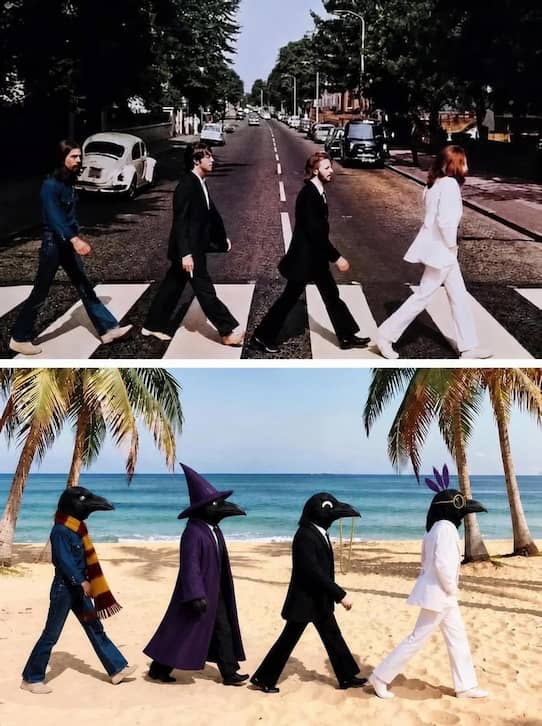
Upload a photo and describe exactly what to change. The AI preserves faces, poses, lighting, and background geometry—so the result still looks like your original image, not a random generation.

checkedCharacter design & concept art
checkedSeason and location changes
checkedProduct mockup or scene variations
Image 1Image 2Image 3

New Style, Same Subject

Turn a portrait into an illustration, a summer scene into winter, or a studio shot into a street photograph. The AI rebuilds textures and atmosphere around your original composition while keeping subjects recognizable.

Image 1

Skip the Learning Curve

No layers, masks, or color wheels. What takes an hour in traditional editors—swapping backgrounds, removing objects, or relighting a portrait—finishes here in about twenty seconds. Works on any device without installation.

Image 1

What is Image to Image AI?

Image to Image AI revolutionizes photo editing by transforming existing photos via text prompts. Unlike standard generators that create visuals from nothing, this technology treats your original image as a foundation, ensuring the final output remains grounded in reality rather than starting from scratch.
The core strength of Image to Image AI is its commitment to consistency. The AI analyzes your uploaded image—its composition, lighting, and structure—and uses it as a strict blueprint for any changes. When you provide a text command, the AI seamlessly integrates your request while preserving the original photo's integrity. This guarantees that every edit feels natural and perfectly aligned with your base image.
This unique combination of a visual anchor and a text prompt unlocks a world of creative control. It empowers you to perform complex edits, explore artistic styles, and visualize ideas with unprecedented speed and ease. Achieve polished, high-impact visuals that maintain perfect consistency with your source photo, using just text and zero Photoshop skills.

Trusted by Creatives and Professionals Worldwide

Emma Chung

Emma Chung

Freelance Concept Artist | Tokyo

I used to spend 8 hours sketching character variations for clients. Now I generate 20+ polished options in 30 minutes using my rough drafts as base images. My income doubled since adopting this workflow!

Anya

Anya

E-commerce Photography Studio | Berlin

Transforming basic product shots into lifestyle images used to cost €150 per photo. With Image to Image AI, we create 50 variations daily at 5% of the cost. Our clients think we've hired a full production team!

Marcus Johnson

Marcus Johnson

Indie Game Developer | Seattle

Our 3-person team creates quality environment art by upscaling and restyling our basic sketches. What took months now takes days - we shipped our game 4 months early thanks to this tool.

Sophia

Sophia

Realtor | Coastal Properties

Changing seasons and furniture in property photos used to require expensive reshoots. Now we transform empty rooms into staged homes and sunny days into golden hour - listings sell 40% faster!

Aki Hasegawa

Aki Hasegawa

Digital Marketing Lead | Velocity Agency

Creating consistent branded content across 8 platforms was impossible. Now I transform one hero image into 20 styled variations daily. Our engagement rates tripled with this cohesive yet diverse feed!

Isabelle Dubois

Isabelle Dubois

Founder | Dubois Design Studio

Client visualization is everything. I can now take a photo of a client's living room and show them a 'Modern Minimalist' version and a 'Cozy Bohemian' version in the same meeting. It closes deals faster because clients can *see* the vision instantly.

How to Generate Image from Image

Follow our straightforward process to create stunning new images from your photos

01
Icon

Upload Source Image

Upload your image(s) to get started. Image to Image AI will strictly ensure the consistency of your images throughout the editing process. You can upload a single image for editing or multiple images for merging.

02
Icon

Describe Your Vision

Select the desired aspect ratio, then write your prompt in plain, everyday language. For example, 'turn this into a watercolor painting' or 'add a futuristic city in the background'.

03
Icon

AI Generation

Wait for the AI to process your image. The Image to Image AI Generator model takes around 20 seconds, while the Image GPT model takes approximately 90 seconds.

04
Icon

Save Your Creation

Once the AI has completed its work, you can download your image. Be sure to download your image promptly to save your creation.

Edit Like a Pro. No Skills Needed.

Free edits queue during busy hours. Go Pro for instant generation, higher resolution, and full commercial rights.

Upgrade to Pro

Why Choose Image to Image AI

Image to Image AI transforms your vision into reality, offering faster, more intuitive, and more powerful creation than traditional editing or other generative AI tools.

Achieve Perfect Control and Consistency

Starting with your photo eliminates the randomness of text-only AI. With Image to Image AI, your picture provides a solid foundation, ensuring the original composition and lighting are maintained. This gives you precise control, making every edit feel intentional and consistent—critical for professional and branded content.

Drastically Accelerate Your Workflow

Image to Image AI completes tasks in seconds that normally take hours. Instantly generate stylistic variations, create product mockups, or restore old photos with a single command. This incredible speed boosts your productivity and lets you iterate on creative ideas faster than ever before.

Unlock Professional Power, No Skills Needed

You no longer need to master complex tools like Photoshop to produce high-quality visuals. Image to Image AI democratizes creativity by translating simple text descriptions into stunning results. It empowers anyone to execute professional-level concepts effortlessly, turning ideas into reality with just a few words.

Frequently Asked Questions

What does Image to Image AI mean?

Image to Image AI is a type of generative artificial intelligence that transforms an existing image based on a text prompt. Instead of editing a picture from scratch, it uses your uploaded image as a structural reference. For example, you can turn a photo of your pet into a cartoon character or change a summer landscape into a snowy winter scene.

What's the process behind AI Image Generator from Image?

AI image generators transform input images into new versions using deep learning models like GANs or diffusion models, guided by user prompts.

What image formats are supported?

We accept common formats like JPG, PNG, and WEBP. High-resolution files work best.

Can I edit multiple images at once?

Yes! Upload multiple photos to merge styles in our Image GPT Generator with ease.

How long does processing take?

Processing times vary depending on the model used. For Image to Image AI Generator, it typically takes around 20 to 30 seconds. For Image GPT Generator, the process usually lasts between 50 to 90 seconds. Note that larger files or more detailed prompts might extend these times slightly.

Can I use the generated images for commercial purposes?

The ability to use AI-generated images commercially depends on your service and subscription plan. Paid plans often include commercial licenses, while free tiers restrict such use.

What kind of input images work best?

For the best results, start with a clear, well-lit image where the subject and composition are easy to distinguish. Higher-resolution images tend to provide the AI with more detail to work with, leading to better outputs.

How do I write a good prompt?

Effective prompts are clear and descriptive. Start with the main subject, then add details about the desired style, mood, lighting, and environment. Instead of just 'make it a painting,' try 'an impressionist oil painting with thick, visible brushstrokes and a warm, golden hour lighting.' Combining a strong input image with a detailed prompt gives you the most control over the final result.

Are my uploaded images kept private?

Absolutely! We prioritize your privacy and ensure that your uploaded images are kept confidential. Your data is secure with us.

How is this different from Photoshop or other editors?

Traditional tools require manual effort. Our AI automates complex edits—like changing art styles or seasons—with just a text prompt, saving hours of work.